Editable by design
In the standard in-app flow, review foods, portions, and nutrients before saving. Siri logs should be checked afterward.
AI calorie & nutrition tracker
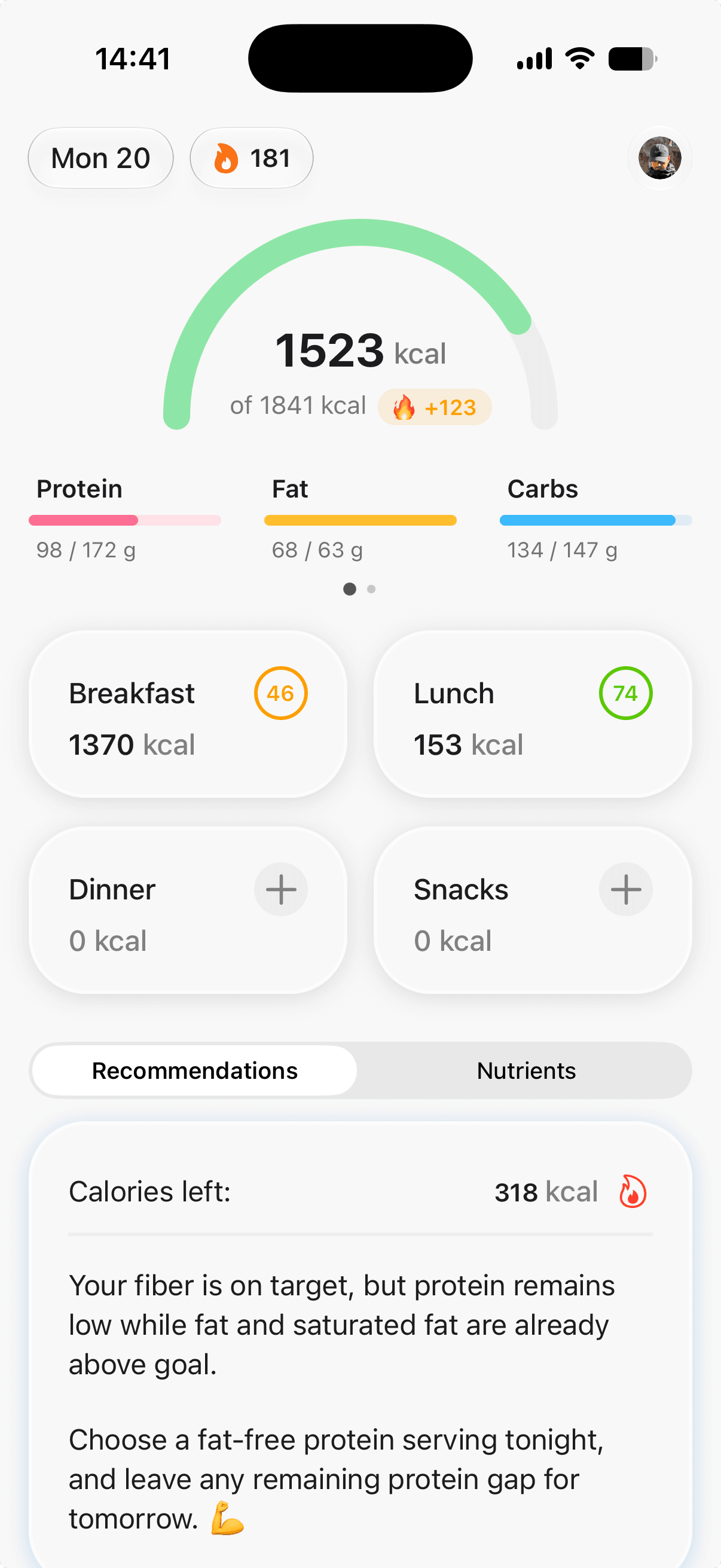
Log by photo, gallery, barcode, voice, or text. Review the estimate, track the nutrients that matter, and get guidance shaped by your goals and activity.
Food Memory
Oats · saved portion 80 g
Meal insight
Fiber looks low today
Review and correct every estimate
How it works
Food Focus shortens the work without pretending an AI estimate is perfect. You stay in control of what gets saved.
Take a photo, choose one from your gallery, scan a package, speak naturally, or type what you ate.
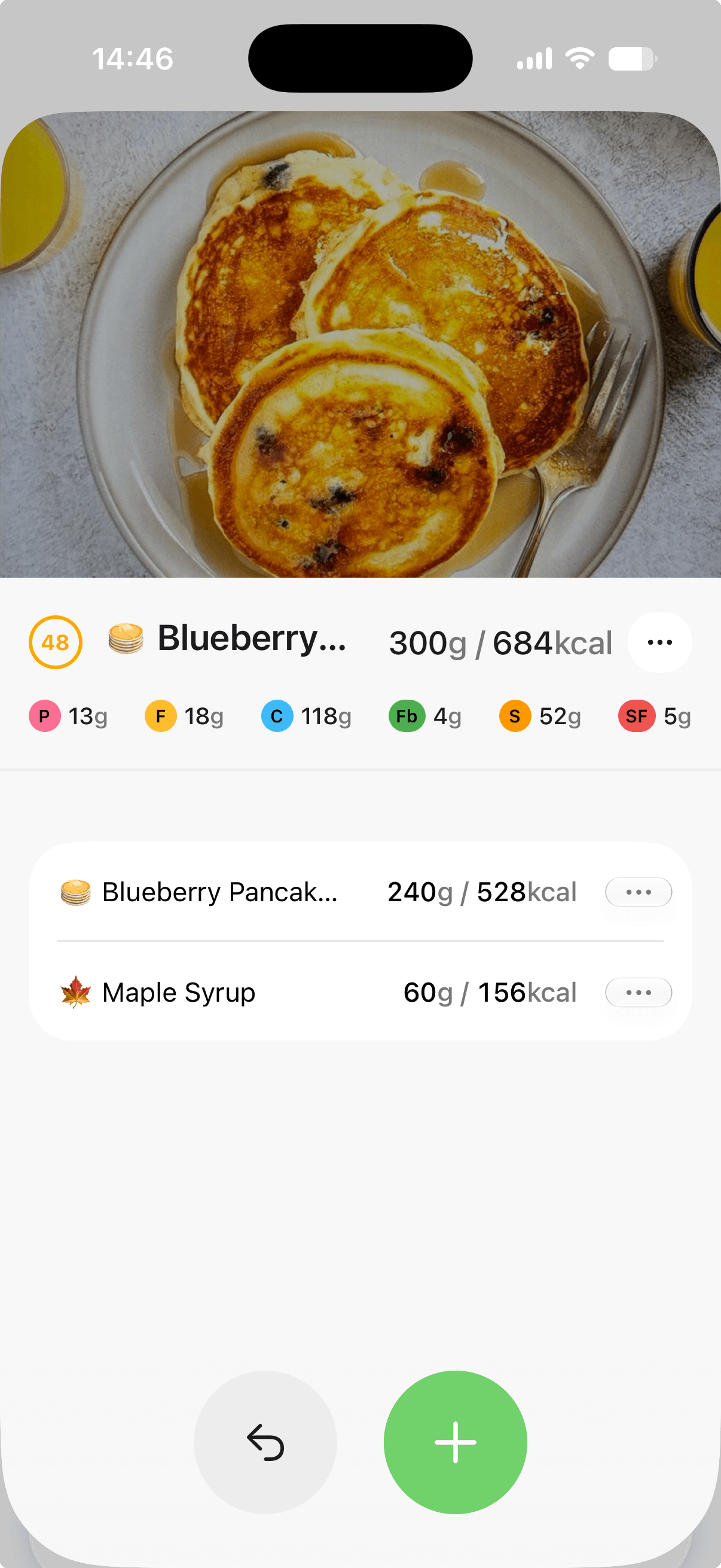
Check the detected foods and portions. Correct names or quantities directly before saving; after a meal is logged, Edit with AI can apply a typed or spoken change.
Save the meal, watch your day update, and let its recognized ingredient grams become Food Memory hints.
Food Memory
When enabled, Food Memory normally keeps one current gram hint for each recognized, normalized ingredient after a single meal is saved. It may use that value as context when a later photo, voice, or text amount is ambiguous.
Example memory
Greek yogurt
Current stored gram hint
Rolled oats
Current stored gram hint
Almond milk
Current stored gram hint
Know what was estimated
Every saved meal can include calories, protein, fat, carbohydrates, fiber, added sugar, and saturated fat. Photo, gallery, voice, and text analyses can also receive an AI-estimated Health Index; a barcode entry currently starts at zero instead of receiving that same assessment.
See energy, protein, fat, and carbohydrates together.
Keep fiber, added sugar, and saturated fat visible.
Fix an ingredient or portion without deleting the meal.
After enough logs, see nutrients your recent foods may undersupply.
Nutrient-gap suggestions are AI inferences from recent food names—not measured blood levels, clinical deficiencies, or a full micronutrient ledger.
A complete daily loop
The useful part starts after the food is logged: clearer targets, patterns you can revisit, and automatic guidance you can evaluate.
In the standard in-app flow, review foods, portions, and nutrients before saving. Siri logs should be checked afterward.
Set goals, diet preferences, activity level, and weight-loss pace to create a more relevant daily plan.
Apple Health active calories can adjust your daily target so a more active day gets useful context.
Explore 7, 30, and 90-day views for calories, macros, calorie split by meal type, key nutrients, top foods, and consistency.
Save foods and copy or paste meals when your routine repeats—without rebuilding the same plate every day.
Receive automatic daily recommendations in one of seven styles, shaped by your goals, meals, and available activity.
Use the Food Focus interface in more than 20 languages, from English and Portuguese to Ukrainian and Japanese.
Quick Log and Daily Progress widgets plus Siri meal logging help iPhone users capture food with fewer taps.
Progress without the spreadsheet
Daily totals are useful; patterns are better. Explore 7, 30, or 90 days of calories versus target, macro balance, key nutrient averages, calorie split by meal type, top foods, and consistency.
Illustrative week
1,842 avg kcal
Transparent by default
A single photo cannot show every hidden ingredient. Food Focus is designed to make assumptions reviewable and corrections easy—not to replace a food label, scale, dietitian, or doctor.
Read sources & methodologyAI-estimated foods and portions. Best reviewed before saving.
Open Food Facts first, USDA fallback, and AI estimates only for tracked fields the record is missing.
Edited quantities become the version stored in your food log.
Informational patterns and suggestions—not medical advice.
Latest from the blog
The Food Focus blog gives direct, sourced answers about AI food logging, nutrition data, remembered portions, and the limits every tracker should explain.
Explore the Food Focus blogWalk through an ordinary lunch example and check three things the camera cannot confirm on its own: the food, the amount eaten, and the missing details.
Read the evidence-led guideSimple start
Use Cloud AI for your first 10 saved meals. After that, Cloud requires Pro, while on-device AI remains free on compatible iPhones and iPads. Subscription pricing appears in your app store before purchase.
Cloud AI trial
10 saved meals
Review and correct each estimate. On-device AI can continue without Pro on compatible Apple devices.
Questions, answered
Need something else? Email foodfocus.hello@gmail.com.
Food Focus is an AI-assisted calorie and nutrition tracker for iOS and Android. You can log meals with a photo, gallery image, barcode, voice, or text, then review and edit the estimated nutrition before saving it.
A photo can provide a useful estimate, but it cannot reliably reveal every ingredient, cooking oil, sauce, or exact portion. Food Focus makes the result editable so you can correct foods and quantities. For packaged food, a barcode starts with Open Food Facts or USDA data, but missing tracked fields may still be AI-estimated and should be checked against the package.
Food Memory is enabled by default on each device; its toggle is not synced account-wide. In the normal single-meal flow, it stores a current gram hint for each recognized, normalized ingredient and may use it when a later photo, voice, or text amount is unclear. You can edit, delete, or clear account entries, with up to 200 retained.
Saved meals can include calories, protein, fat, carbohydrates, fiber, added sugar, and saturated fat. Photo, gallery, voice, and text analyses can also receive an AI-estimated Health Index; barcode entries currently start at zero instead. After at least 10 total logs, the app can use the latest 7 days of food names to infer possible nutrient gaps, not measured deficiencies.
Yes. The core meal logging, nutrition tracking, automatic guidance, and progress experience works on iOS and Android. Apple Health, Siri logging, and iOS widgets are Apple-platform features and are not currently available on Android.
Food Focus is free to download. The first 10 saved meals can use Cloud AI; afterward Cloud requires Pro. Compatible iPhones and iPads can keep using free on-device AI. Subscription pricing is shown in the App Store or Google Play before purchase and may vary by platform and region.
No. Nutrition estimates, Health Index scores, and AI suggestions are informational and are not medical advice, a diagnosis, or a substitute for a qualified healthcare professional.
Available now
Download Food Focus and try Cloud AI for your first 10 saved meals. On-device AI is free on compatible iPhones and iPads.
Food Focus uses essential storage for this choice. Optional analytics and advertising measurement help us understand website use and which ads lead to App Store clicks. They load only if you accept. Read the privacy policy.